
Wayne County Register of Deeds, Michigan
"Pay As You Go" is the Wayne County Register of Deeds (ROD) term for a timed-access search session. Pay As You Go (PAYG) provides registered and commercial users full search access and the ability to purchase document copies at wayne.mi.publicsearch.us.
Rates for Pay As You Go by user type:
| User Type |
Pay As You Go (PAYG) Pricing (full search access) |
Copy Pricing in a PAYG session |
|---|---|---|
| Registered & Signed In | $6 for 15 minutes; $24 for 1 hour | $2 per page; maximum of $10 per document |
| Commercial Account Subscriber (Admin or Team Member) | $6 for 15 minutes; $21 for 1 hour | $1 per page; maximum of $5 per document |
Purchase a PAYG session
To gain access to full search (Quick Search and an extended set of criteria in Advanced Search), click on either of the Pay As You Go links on the left side of the home page.
- You will be directed to a screen where you can choose your duration -- either 15 minutes or 1 hour (pricing for 1 hour sessions differs between registered users and subscribers).
- After selecting the duration, the next screen will collect payment.
- Registered users - only payment by credit card is accepted.
- Subscribers (Administrators or Members) -- only payment by escrow drawdown is accepted.
- The link to the escrow account with Wayne County ROD is solely managed by the Commercial Account Subscription Administrator.
- Click Pay. Please be patient as processing may take up to 5 seconds.
-
Upon successful payment, you will arrive as your receipt screen (example at right).
- NOTE: You can always see your receipts of past purchases by visiting your Account Settings (click on your name at upper right) and selecting Order History from the left menu.
Initiate a PAYG session to access full search
A successfully purchased Pay As You Go session is initiated from the receipt screen. See image of an example receipt above. The PAYG session does not auto-start. The full search access and countdown will not begin until you click "Initiate Pay As You Go Session" from the receipt.
- NOTE: If you happen to navigate away from the receipt screen and need to get back to it, visit your Account Settings (click on your name at upper right) and select Order History from the left menu.
Once you've initiated the session, you will be redirected to the home screen, which will show the Quick Search option by default. To access Advanced Search, which provides indexed data-specific document searches, click "Advanced Search" just above the search bar.
IMPORTANT NOTE: Once you start the session, you cannot pause it.
At this point you will be able to conduct full searches of the Wayne County ROD official records.
See these articles for search tips:
PAYG & document copies
From your search results and document viewer screens, you'll find the documents you need. From each view, you can add the document to your cart to purchase and download it.
- From search results, click on the three dots on the result row and select either Add To Cart or Express Checkout.
- From the document view screen (screen where the image appears at left and index data at right), you can click on either the Add To Cart or Express Checkout buttons.
IMPORTANT NOTE: Document copy purchases can only be made from within a PAYG session. If your time runs out, you will need to purchase another session to complete your copy purchase.
Session expiration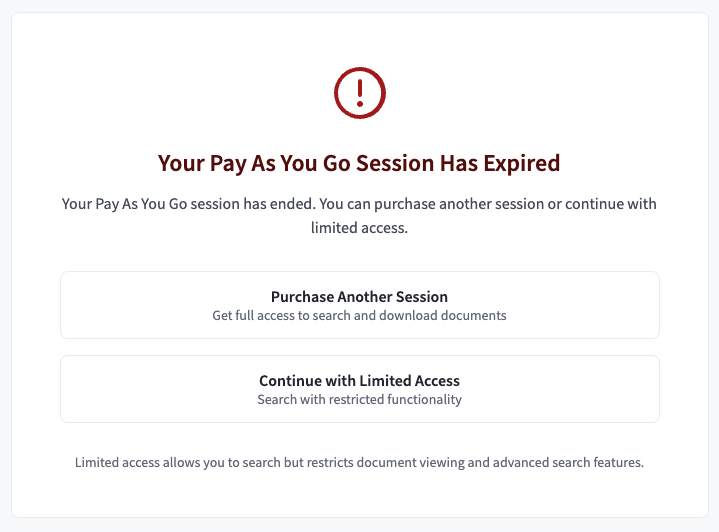
Your session timer will be fixed at the upper middle of the screen and countdown the remaining time. You must make any document purchases from within a PAYG session. Purchases of document copies outside of PAYG are not granted.
When your session time runs out, you will immediately be redirected to a session expiration screen. From here, you can either purchase additional time or return to the home screen for free, limited search.
Comments
0 comments
Please sign in to leave a comment.